

 Hytale Portal – Ready-to-use Landingpage for your Server
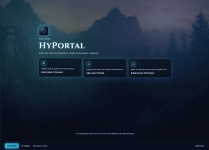
A lightweight, ready-made landing page for Hytale servers.
No framework, no build tools, no backend — just upload and use.
 What It Is
- A complete landing page made specifically for Hytale servers
 Shows live server status and player count
 Fully customizable via an in-browser config panel
 Built with plain HTML, CSS, and JavaScript
 No Node, no npm, no build step required
 Who It’s For
- Hytale server owners who want a professional landing page
- Users without coding knowledge
- Servers that want a simple, fast, and dependency-free solution
Features
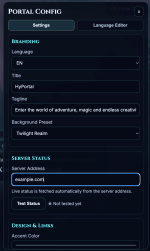
Branding
- Title and tagline
- Background (preset or custom URL)
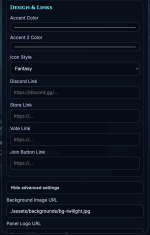
- Two accent colors
- Icon styles (Default, Fantasy, Pixel)
- Panel logo and footer text
- All texts editable directly in the panel
 Layout & Icons
- Change all visible texts without editing code
- Switch between different icon packs
- Replace or add custom icons manually
- Fully customizable links and buttons
Server Status
Enter your server address:- play.yourserver.gg
- play.yourserver.gg:5521
 Links
Links
- Discord
- Store
- Vote
- Join button
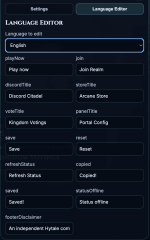
Languages
- English, German, Spanish included
- All texts editable via lang/*.json
- Built-in Language Editor inside the panel
- Per-language text overrides stored in the browser
 Installation
- Upload the portal files to your webspace.
- Point your domain to the folder.
- Open the page in your browser.
 First Setup
- Unlock owner mode:
- Press Ctrl + Shift + O
- Enter the owner key
- Open the config panel.
- Set:
- Server address
- Title and colors
- Links and language
- Click Save.
Your landing page is ready.
 Owner Mode
The config panel is hidden from normal visitors.Unlock
Shortcut:
- Ctrl + Shift + O (Windows/Linux)
- Cmd + Shift + O (Mac)
Or open:
Code:
https://your-domain.com/?owner=1&ownerKey=YOUR_KEYLock again
Code:
https://your-domain.com/?owner=0Change owner key
Edit:
Code:
js/owner-config.jsExample:
Code:
window.PORTAL_OWNER_CONFIG = {
key: "your-secret-key",
queryParam: "ownerKey",
shortcut: true
}; File Structure
Code:
/
  .gitignore
  LICENSE
  README.md
  index.html

  css/
    styles.css

  js/
    app.js
    owner-config.js

  lang/
    de.json
    en.json
    es.json

  assets/
    favicon.svg
    manifest.json

    backgrounds/
      bg-day.jpg
      bg-night.jpg
      bg-twilight.jpg

    icons/
      default/
        default-1.png … default-6.png
      fantasy/
        fantasy-1.png … fantasy-6.png
      pixel/
        pixel-1.png … pixel-6.png

    ui/
      panel-logo-default.png
Server Status
Uses built-in API:
Code:
https://api.bitaces.dev/status.php- No setup required.
- If the server or API is unreachable, it shows:
Code:
Offline / 0 players Links
Support / Feature Requests:Join the BitaceS.dev Discord Server!
Check out the BitaceS.dev community on Discord - hang out with 3 other members and enjoy free voice and text chat.
GitHub Source:
GitHub - BitaceS/hytale-portal: Landing page for Hytale servers. Vanilla HTML/CSS/JS, live status, config panel, no build.
Landing page for Hytale servers. Vanilla HTML/CSS/JS, live status, config panel, no build. - BitaceS/hytale-portal
 github.com
 Notes
Notes
- Frontend-only project.
- Owner protection is not real server-side security.
- Status depends on the external API.
 Quick Summary
Upload files → unlock panel → enter server address → save.Done in under a minute.
-
 Bildschirmfoto 2026-02-19 um 15.02.49.png
 -
 Bildschirmfoto 2026-02-19 um 15.03.10.png
 -
 Bildschirmfoto 2026-02-19 um 15.03.22.png
 -
 hyportal.png